
Sharing Your Mixtapes
You've created the perfect mixtape—now it's time to share it! Mixtape Society gives you flexible options to match any occasion, from casual links to beautifully themed gift experiences.
🎯 Quick Overview
After saving your mixtape, you have three sharing options:
| Method | Best For | Recipient Experience |
|---|---|---|
| Quick Share | Casual sharing, messaging apps | Direct to player |
| Gift Experience | Special occasions, surprises | Themed landing page |
| QR Code | Physical gifts, events | Scan to access |
📱 Getting Your Share Link
Save Your Mixtape
- In the editor, click Save (or press Ctrl + Enter)
- The app generates a unique, permanent public link
- The sharing modal appears automatically
The Share Link Format
Your link will look like:
- Slug: Human-readable title (
summer-vibes) - Date: When created (
20251217) - ID: Random unique identifier (
abcd1234)
This format ensures:
- Links are memorable
- No conflicts with other mixtapes
- Privacy through unguessable IDs
🔗 Quick Share (Simple Link)
Perfect for everyday sharing via text, email, or messaging apps.
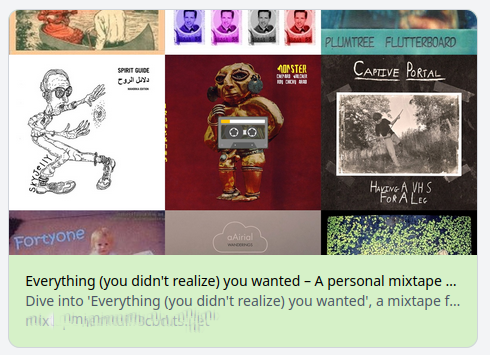
When to Use
- Sharing with friends casually
- Social media posts
- Quick "check this out" moments
- Group chats or Discord servers
- Email newsletters
How It Works
- Click Copy Link in the share modal
- Paste anywhere you can share URLs
- Recipients click and start listening immediately
What Recipients See
- Direct access to the player
- Full track listing
- Cover art display
- All playback controls
- No login or signup required
Sharing Tips
Add Context
When sharing links, add a personal message: "Made this thinking of our road trip! Hope you enjoy! 🎵"
🎁 Gift Experience (Themed Landing Page)
Transform your mixtape into a memorable gift with a beautiful themed landing page.
Choosing a Theme
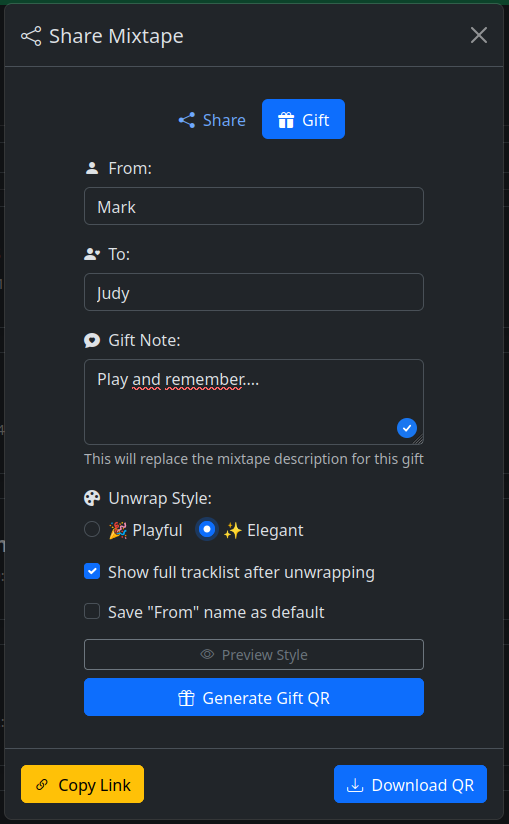
Playful Theme
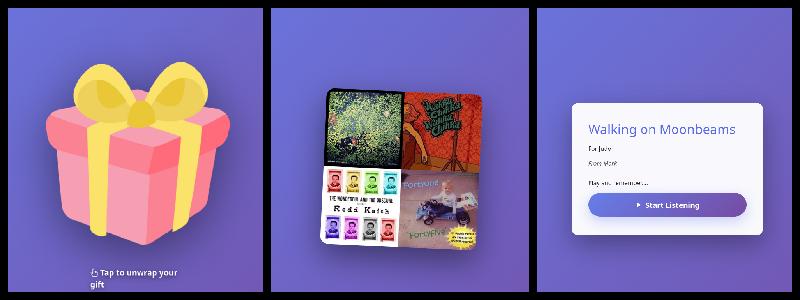
Best for:
- Birthday mixtapes
- Party playlists
- Fun, upbeat collections
- Celebrations and happy occasions
- Friends and casual gifts
Design characteristics:
- Vibrant colors
- Energetic feel
- Casual, fun typography
- Playful animations
Elegant Theme
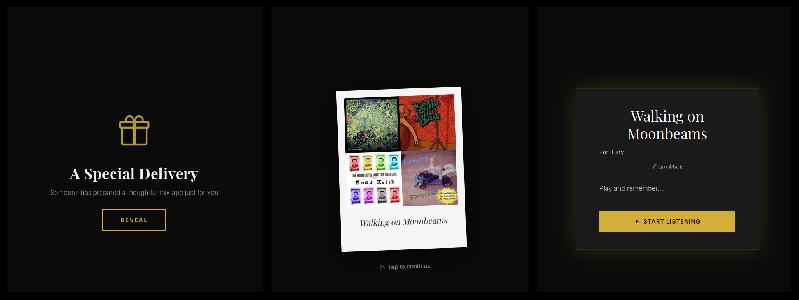
Best for:
- Anniversary mixtapes
- Romantic collections
- Meaningful milestone gifts
- Heartfelt messages
- Sophisticated occasions
Design characteristics:
- Refined, minimalist design
- Elegant typography
- Subtle animations
- Timeless aesthetic
How to Create a Gift Link
- Save your mixtape
- In the share modal, select Gift Experience
- Choose Playful or Elegant theme
- Copy the generated gift link
- Share with your recipient
What Recipients Experience
- Landing Page - Beautiful themed page with your cover art
- Liner Notes - Your personal message displayed prominently
- "Unwrap" Button - Playful theme shows "Unwrap Your Gift"
- "Open" Button - Elegant theme shows "Open Mixtape"
- Player Reveal - Smooth transition to the full player
Gift Link Tips
Maximize Impact
- Write heartfelt liner notes for the landing page
- Choose cover art that complements the theme
- Match the theme to the mixtape's emotional tone
- Send with anticipation: "I made you something special..."
Perfect Occasions
Playful Theme: - "Your 30th Birthday Bangers" - "Summer BBQ Essentials" - "Workout Energy Boost" - "Road Trip Mix Vol. 3"
Elegant Theme: - "Our First Year Together" - "For Your Wedding Day" - "In Memory of..." - "Welcome to the World, Baby Emma"
📷 QR Codes
Perfect for bridging digital and physical sharing experiences.
Download Options
When you select QR code sharing, you can download:
- Simple QR Code - Black and white, for printing
- Enhanced QR Code - Includes cover art and title
Use Cases
Greeting Cards
- Download enhanced QR code
- Print on cardstock or photo paper
- Include in birthday, anniversary, or thank-you card
- Recipient scans with phone camera
- Instant access to your mixtape
Card ideas:
- "Scan to hear why you're amazing"
- "Your birthday soundtrack awaits"
- "Open when you need a smile ♪"
Physical Gifts
Gift Tags:
- Attach QR code tag to wrapped presents
- Include with flower arrangements
- Add to gift baskets
- Accompany jewelry or other presents
Printable Booklet:
- Cover art on front
- QR code on back
- Track listing inside
- Liner notes with personal messages
- Song-by-song explanations
Events & Parties
Party Materials:
- Table tent cards with QR codes
- Guests scan to access party playlist
- Everyone can cast to speakers
- Creates shared listening experience
Wedding Favors:
- Custom cards for each guest table
- Reception playlist access
- Couple's love story in songs
- Memorable keepsake
Venue Signage:
- Large QR code prints
- Background music at gatherings
- Gallery opening soundtracks
- Pop-up shop ambiance
Creative Implementations
Photo Album:
- Add QR codes to physical photo albums
- "Soundtrack to Our Vacation"
- Each section has matching music
Care Packages:
- Include QR code in mail packages
- Adds emotional soundtrack
- Perfect for long-distance relationships
Memory Books:
- Scrapbooks with embedded QR codes
- Songs that capture moments
- Multi-sensory memories
QR Code Tips
Print Quality
- Use high DPI (300+) for clarity
- Test scan before mass printing
- Ensure good contrast
- Leave white border around QR code
Physical Placement
- Make QR codes prominent and obvious
- Include text: "Scan me!" or "Tap to play"
- Ensure good lighting where placed
- Consider phone access angle
🔒 Privacy & Access Control
What You Control
Link Privacy:
- Links use random IDs that can't be guessed
- No public directory of mixtapes
- Only people with the link can access
- Same link works for all sharing methods
Lifetime Management:
- Links are permanent by default
- Never expire automatically
- Delete mixtape to revoke all access
- No time limits or view counts
Content Control:
- Edit mixtape anytime
- Changes reflect immediately for all recipients
- Same link works after edits
- Update cover, tracks, or liner notes freely
What Recipients See
No Personal Data:
- No tracking of who listens
- No analytics or view counts
- No IP address logging
- Complete privacy for recipients
No Barriers:
- No login required
- No account creation
- No email collection
- No cookies (beyond essential playback)
Sharing Best Practices
Share Responsibly
While links are hard to guess, anyone who receives the link can access the mixtape. Only share with people you trust, or delete the mixtape when you want to revoke access.
Sensitive Content
If sharing mixtapes with personal or sensitive liner notes: - Consider who might forward the link - Use private communication channels - Remember that recipients can share further - Delete when no longer needed
🎨 Creative Sharing Ideas
Occasions
Birthdays:
- Curate songs from their birth year
- Include memories from each decade
- Theme: their favorite genre journey
- Playful gift theme
Anniversaries:
- Songs from key relationship moments
- "Our Story in 15 Songs"
- Include first dance, first concert, etc.
- Elegant gift theme
Graduations:
- Motivational anthems
- Songs about new beginnings
- Advice in liner notes
- Playful theme with inspiring message
New Baby:
- Lullabies and soft songs
- Welcome messages in liner notes
- Gift QR code with baby blanket
- Elegant theme for sentimental touch
Breakups/Support:
- Healing playlist for friends
- Empowering anthems
- "You've Got This" message
- Simple link with supportive text
Long Distance
Monthly Musical Letters:
- Create new mixtape each month
- Share your current mood through music
- Liner notes as voice memo-style updates
- Builds ongoing soundtrack to relationship
Time Capsule:
- Create mixtape of current favorites
- Seal with message: "Open in 5 years"
- Document this moment in time
- Use elegant theme for gravitas
Work & Professional
Team Building:
- Collaborative office playlist
- QR codes at desks
- Shared listening during lunches
- Builds team culture
Store/Business Ambiance:
- Curated brand soundtrack
- QR code at entrance
- Customers can take the vibe home
- Memorable brand experience
🔄 After Sharing
Editing Shared Mixtapes
You can always:
- Add or remove tracks
- Reorder the sequence
- Update cover art
- Revise liner notes
- Change the title
Recipients see:
- Updates immediately
- Same link continues working
- No re-sharing needed
Managing Your Collection
Track what you've shared:
- Review all mixtapes in browse view
- See creation dates
- Organize by audience or occasion
- Delete when no longer needed
Removing Access
To stop sharing:
- Go to browse page
- Find the mixtape
- Click delete
- Confirm deletion
- All links immediately stop working
Deletion is Permanent
Once deleted, the mixtape and all its data are gone. Recipients can no longer access it. There's no recovery—make sure you're ready!
❓ Common Questions
How long do links last?
Links are permanent and never expire unless you delete the mixtape.
Can I see who's listening?
No, we don't track listeners. Privacy is built-in for both you and recipients.
Can I change a mixtape after sharing?
Yes! Edit anytime. The link stays the same, and recipients see updates immediately.
Can I use multiple sharing methods for one mixtape?
Absolutely! Generate a simple link for one friend, a gift link for another, and a QR code for a card—all for the same mixtape.
What if someone shares my link publicly?
Anyone with the link can access it. If this happens, delete the mixtape to revoke all access, then create a new one to share privately again.
Can I password-protect a mixtape?
Not currently. Access control is through link privacy only (unguessable URLs).
Do I need to reshare after editing?
No! Edits appear immediately for everyone who has the link. The URL never changes.
📚 Related Guides
- Editor Guide - Learn to create amazing mixtapes
- Collection Management - Manage your music library
- Recipient's Guide - How friends experience your mixtapes
Share the joy of music! 🎵