Getting Started for Recipients
Someone shared a mixtape with you! This quick guide will help you open it and start listening in seconds.
🎧 The Basics
No Account Needed
You don't need to:
- ❌ Create an account
- ❌ Download an app
- ❌ Sign up for anything
- ❌ Enter personal information
You just need to:
- ✅ Click the link
- ✅ Press play
- ✅ Enjoy!
📱 Opening Your Mixtape
Method 1: Direct Link
The most common way to receive a mixtape is through a simple link.
You might receive it via:
- Text message (SMS/iMessage/WhatsApp)
- Social media (Instagram, Facebook, Twitter)
- Messaging apps (Discord, Slack, Telegram)
To open:
- Tap or click the link
- Your browser opens automatically
- The mixtape player loads
- Hit ▶️ Play
Example link:
Works Everywhere
The link opens in any web browser on any device—phone, tablet, or computer. No special app needed!
Method 2: Gift Landing Page
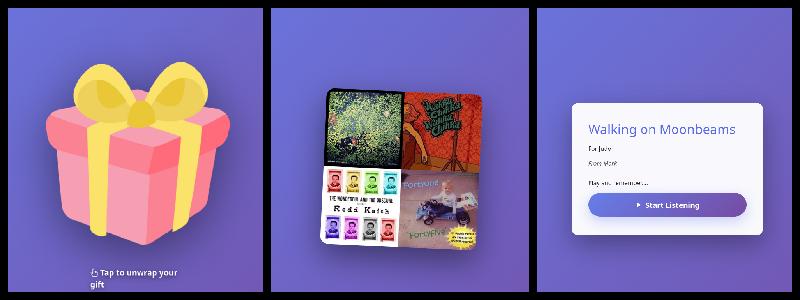
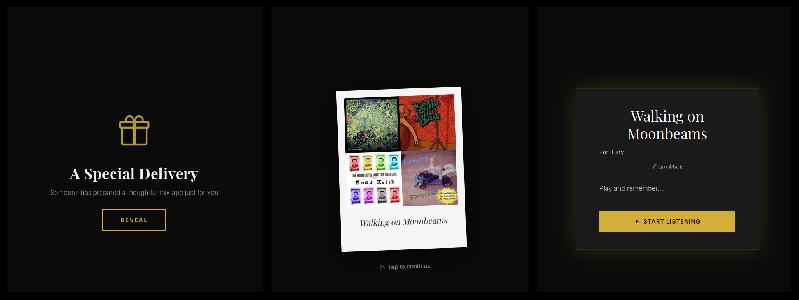
Some mixtapes come with a special themed landing page designed to feel like unwrapping a gift.
What you'll see:
Two possible themes:
Playful Theme:
- Bright, energetic design
- "Unwrap Your Gift" button
- Perfect for celebrations and fun occasions
Elegant Theme:
- Sophisticated, refined design
- "Open Mixtape" button
- Perfect for heartfelt or romantic occasions
How it works:
- Click the link
- See the beautiful landing page with cover art
- Read the personal message (liner notes)
- Click "Unwrap Your Gift" or "Open Mixtape"
- The player appears and you can start listening
Special Moment
The creator chose this gift experience to make receiving the mixtape feel special. Take a moment to appreciate the presentation!
Method 3: QR Code
You might receive a QR code on a card, gift, or event material.
How to scan:
iPhone/iPad:
- Open the Camera app
- Point at the QR code
- A notification appears at the top
- Tap the notification
- Mixtape opens in Safari
Android:
- Open the Camera app (or Google Lens)
- Point at the QR code
- A link appears or notification pops up
- Tap to open
- Mixtape opens in Chrome
No camera app working?
- Try Google Lens app
- Many messaging apps can scan QR codes
- Ask the sender for the direct link instead
Test Your Scanner
If you've never scanned a QR code before, try scanning one now to test your camera app. Most modern phones can scan QR codes without any additional app.
🌐 Browser Compatibility
Works Best In
iPhone/iPad:
- ✅ Safari (recommended for AirPlay)
- ✅ Chrome
- ✅ Firefox
- ✅ Edge
Android:
- ✅ Chrome (recommended for Chromecast)
- ✅ Firefox
- ✅ Edge
- ✅ Samsung Internet
Desktop (Windows/Mac/Linux):
- ✅ Chrome
- ✅ Firefox
- ✅ Safari (Mac)
- ✅ Edge
- ✅ Opera
Browser Requirements
Minimum versions:
- Chrome 90+
- Firefox 88+
- Safari 14+
- Edge 90+
Update Your Browser
If the mixtape won't load, your browser might be outdated. Update to the latest version for the best experience.
📊 What You'll See
The Player Interface
When the mixtape loads, you'll see:
Main Elements:
- 🎨 Album art - Cover image chosen by creator
- ▶️ Play button - Start/pause playback
- 📜 Track listing - All songs in the mixtape
- ⏱️ Progress bar - See how far through the track
- 🔊 Volume control - Adjust playback volume
- ⏭️ Skip buttons - Next/previous track
Additional Features:
- 🔀 Shuffle mode
- 🔁 Repeat options
- 📊 Quality settings
- 📡 Cast button (if available)
Track Information
For each track you'll see:
- Track number
- Song title
- Artist name
- Album name (if available)
- Duration
Currently playing:
- Highlighted in track list
- Shows progress
- Displays on lock screen (mobile)
🎵 Your First Listen
Recommended Steps
- Get comfortable
- Find a quiet moment
- Put on headphones or connect to speakers
-
Settle in for the experience
-
Read the liner notes (if present)
- The creator may have left a personal message
- Explains why they made this mixtape
-
Adds context to song choices
-
Listen in order (first time)
- The creator carefully arranged the flow
- Songs transition with intention
-
Experience it as designed
-
Enjoy!
- Relax and appreciate the music
- Notice how songs connect
- Let it play through
Save for Later
Love the mixtape? Bookmark the link or add it to your home screen so you can come back anytime!
📱 Add to Home Screen
Save the mixtape for quick access like an app.
iPhone/iPad
- Open the mixtape in Safari
- Tap the Share button (square with arrow)
- Scroll and tap "Add to Home Screen"
- Name it (e.g., "Sarah's Mixtape")
- Tap Add
- Icon appears on your home screen
Android
- Open the mixtape in Chrome
- Tap the ⋮ menu (three dots)
- Tap "Add to Home screen"
- Name it and tap Add
- Icon appears in your app drawer
Benefits:
- ✅ Quick access from home screen
- ✅ Looks like a real app
- ✅ No need to find the link again
- ✅ Full-screen experience
💡 Quick Tips
For Best Quality
On WiFi:
- Use Original or High quality
- Better sound with good headphones
- Streams without buffering
On Mobile Data:
- Use Medium quality (default)
- Switch to Low if connection is slow
- Watch your data usage
For Best Experience
Headphones:
- ✅ Use good quality headphones
- ✅ Ensure proper fit
- ✅ Try different EQ settings on your device
Speakers:
- ✅ Cast to Chromecast or AirPlay
- ✅ Connect via Bluetooth
- ✅ Use quality speakers when possible
Environment:
- ✅ Find a quiet space for first listen
- ✅ Minimize distractions
- ✅ Give it your full attention
🔊 Playing on Other Devices
Want to play on your TV or better speakers?
Quick Options
Chromecast (Android/Chrome)
- Look for the cast icon (📡)
- Tap to select your device
- Full Chromecast guide →
AirPlay (iPhone/iPad/Mac)
- Tap the AirPlay icon
- Select your Apple TV or HomePod
- Full AirPlay guide →
Android Auto (in car)
- Connect phone to car
- Mixtape appears automatically
- Full Android Auto guide →
📶 Connection Requirements
Internet Connection
You need:
- Active internet connection (WiFi or mobile data)
- Stable connection for smooth playback
Data usage:
- Original quality: ~10MB per song
- High quality: ~7MB per song
- Medium quality: ~5MB per song
- Low quality: ~3MB per song
Offline Playback
Currently, mixtapes cannot be played offline. You must have an internet connection to stream.
Speed Recommendations
Minimum:
- 1 Mbps for Low quality
- 2 Mbps for Medium quality
Recommended:
- 5 Mbps for High quality
- 10 Mbps for Original quality
If playback stutters:
- Switch to lower quality
- Move closer to WiFi router
- Close other apps using internet
- Pause and let it buffer
❓ Quick Troubleshooting
Link Won't Open
Try:
- Copy and paste link into browser directly
- Try a different browser
- Check your internet connection
- Ask sender to re-send the link
- Ensure link wasn't truncated in message
Player Won't Load
Try:
- Refresh the page
- Clear browser cache
- Update your browser
- Try different browser
- Disable browser extensions temporarily
No Sound
Check:
- Device volume is up
- Not muted in browser
- Headphones are plugged in correctly
- Bluetooth is connected (if using wireless)
- Browser has permission to play audio
Playback Keeps Stopping
Solutions:
- Switch to lower quality setting
- Pause and let it buffer
- Check internet connection
- Close other apps/tabs
- Move closer to WiFi router
🎁 Showing Appreciation
Love the mixtape? Let the creator know!
Great ways to respond:
- 💬 Send a thank you message
- 🎵 Share your favorite track
- ❤️ Tell them which moments hit hardest
- 🎨 Comment on their song choices
- 🎵 Create one back for them!
Example messages:
- "Track 5 made me cry. Thank you ❤️"
- "This is perfect for my morning runs!"
- "How did you know I needed this today?"
- "The flow from track 3 to 4 is chef's kiss"
📚 Learn More
Next Steps:
- Player Guide - Master all player features
- Streaming Guide - Cast to TVs and speakers
- FAQ - Common questions answered
Need Help?
- Check the FAQ for common issues
- Ask the person who sent you the mixtape
- Ensure your browser is updated
💭 Want to Create Your Own?
Recipients can't create mixtapes—you'd need access to a Mixtape Society server.
Your options:
- Ask the creator if you can use their server
- Set up your own (requires music library and Docker)
- Find a friend who runs a server
Learn about becoming a creator →
Enjoy your mixtape! 🎵